The Complete Guide to the .claude/ Folder in Claude Code
The .claude/ folder is Claude Code's configuration system. Learn what every file does — CLAUDE.md, rules/, commands/, skills/, agents/, and settings.json — and how to set each one up.
The Complete Guide to the .claude/ Folder in Claude Code
TL;DR: The .claude/ folder is Claude Code's configuration system. It contains your project instructions (CLAUDE.md), modular rules (.claude/rules/), custom slash commands (.claude/commands/), auto-triggered workflows (.claude/skills/), subagent personas (.claude/agents/), and permission guardrails (settings.json). Understanding this folder means Claude follows your conventions automatically instead of you repeating yourself every session. Here's what every file does and how to set each one up.
Most Claude Code users never open the .claude/ folder.
They know it exists. They've seen it appear in their project root. But they've never looked at what's inside or configured any of it.
That's a missed opportunity. The .claude folder is the control system for how Claude behaves inside your project. It holds your project-specific instructions, custom slash commands, permission rules, and Claude's memory across coding sessions.
Once you understand what lives where and why, you can configure Claude Code to follow your team's conventions automatically — without repeating yourself every session.
This guide walks through every file and folder inside .claude/, what each one does, and when to use it.
Two Folders, Not One
Before we dive into the specific files, there is one crucial thing you need to know upfront: there are actually two .claude directories.
- The Project-Level Folder (
your-project/.claude/): This holds your team configuration. You commit this to Git. Everyone on the team gets the same rules, the same custom commands, and the same permission policies. - The Global Folder (
~/.claude/): This lives in your home directory. It holds your personal preferences and machine-local state, like session history and auto-memory.
The Full Anatomy at a Glance
Here's everything that can live inside the .claude/ folder:
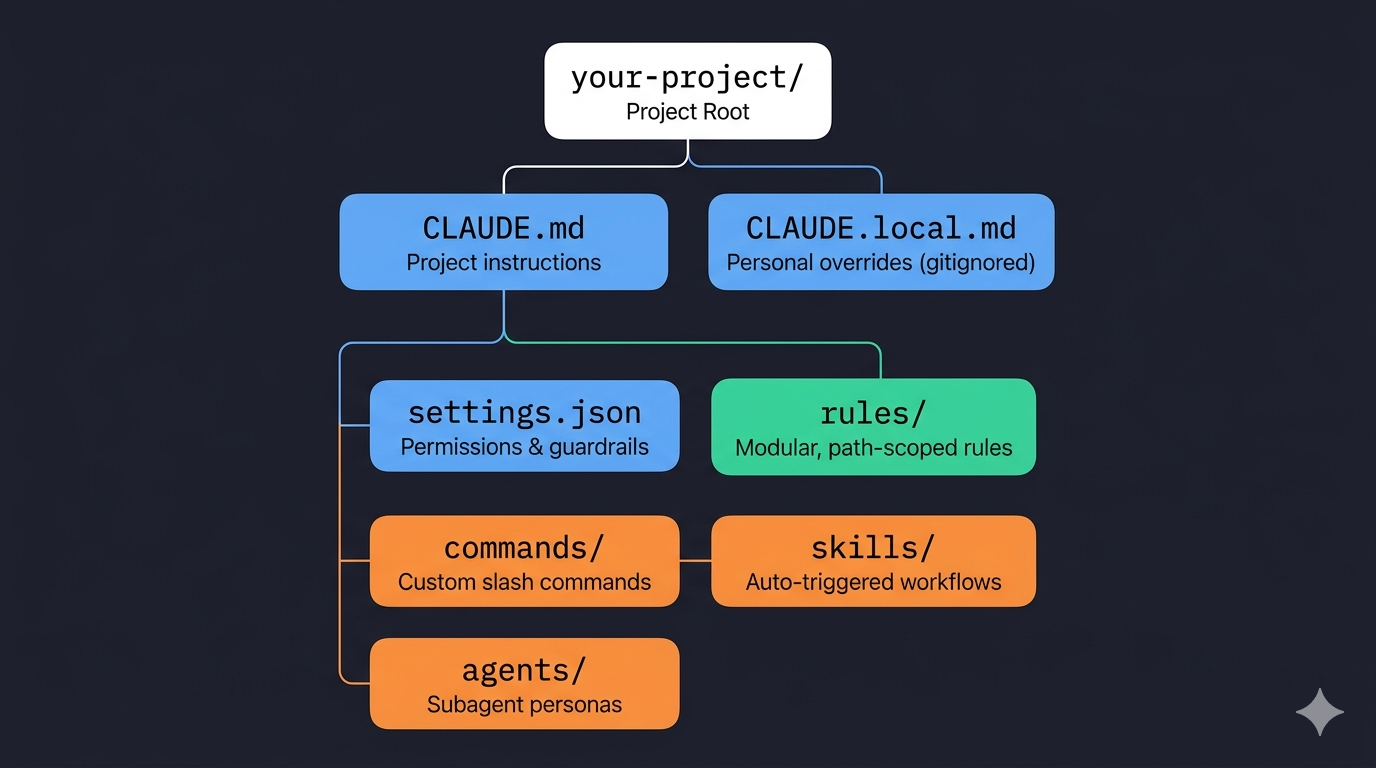
your-project/
├── CLAUDE.md              ← Project instructions (the big one)
├── CLAUDE.local.md        ← Personal overrides (gitignored)
└── .claude/
    ├── settings.json      ← Permissions & guardrails
    ├── rules/             ← Modular, path-scoped rules
    │   ├── code-style.md
    │   ├── testing.md
    │   └── api-conventions.md
    ├── commands/           ← Custom slash commands
    │   ├── review.md
    │   └── fix-issue.md
    ├── skills/             ← Auto-triggered workflows
    │   └── security-review/
    │       └── SKILL.md
    └── agents/             ← Subagent personas
        └── code-reviewer.md
And the quick reference:
| File / Folder | Purpose | Committed to Git? |
|---|---|---|
| CLAUDE.md | Project-wide instructions loaded into every session | Yes |
| CLAUDE.local.md | Personal overrides that stay on your machine | No (gitignored) |
| .claude/rules/ | Modular, path-scoped instruction files | Yes |
| .claude/commands/ | Custom slash commands your team can invoke | Yes |
| .claude/skills/ | Auto-triggered workflows based on task matching | Yes |
| .claude/agents/ | Specialized subagent personas with scoped tools | Yes |
| .claude/settings.json | Permission allow/deny lists and guardrails | Yes |
Let's break down each one, starting with CLAUDE.md.
CLAUDE.md: Claude's Instruction Manual
This is the most impactful file in the folder. When you start a Claude Code session, the first thing it does is read CLAUDE.md. It loads this document straight into the system prompt and keeps it in mind for the entire conversation.
Simply put: whatever you write in CLAUDE.md, Claude will follow.
If you tell Claude to always write tests before implementation, it will. If you say, "never use console.log for error handling, always use the custom logger module," it will respect that every single time.
What Actually Belongs in CLAUDE.md?
Most people either write too much or too little. Keep CLAUDE.md under 200 lines. According to Anthropic's own documentation on Claude Code best practices, files longer than that start eating too much context, and Claude's instruction adherence will actually drop.
DO Write:
- Build, test, and lint commands (
npm run test,make build) - Key architectural decisions ("we use a monorepo with Turborepo")
- Non-obvious gotchas ("TypeScript strict mode is on, unused variables throw errors")
- Import conventions, naming patterns, error handling styles
- File and folder structure for the main modules
DON'T Write:
- Anything that belongs in a linter or formatter config (Prettier handles that)
- Full documentation you can already link to
- Long paragraphs explaining theory
Here is a minimal but effective example:
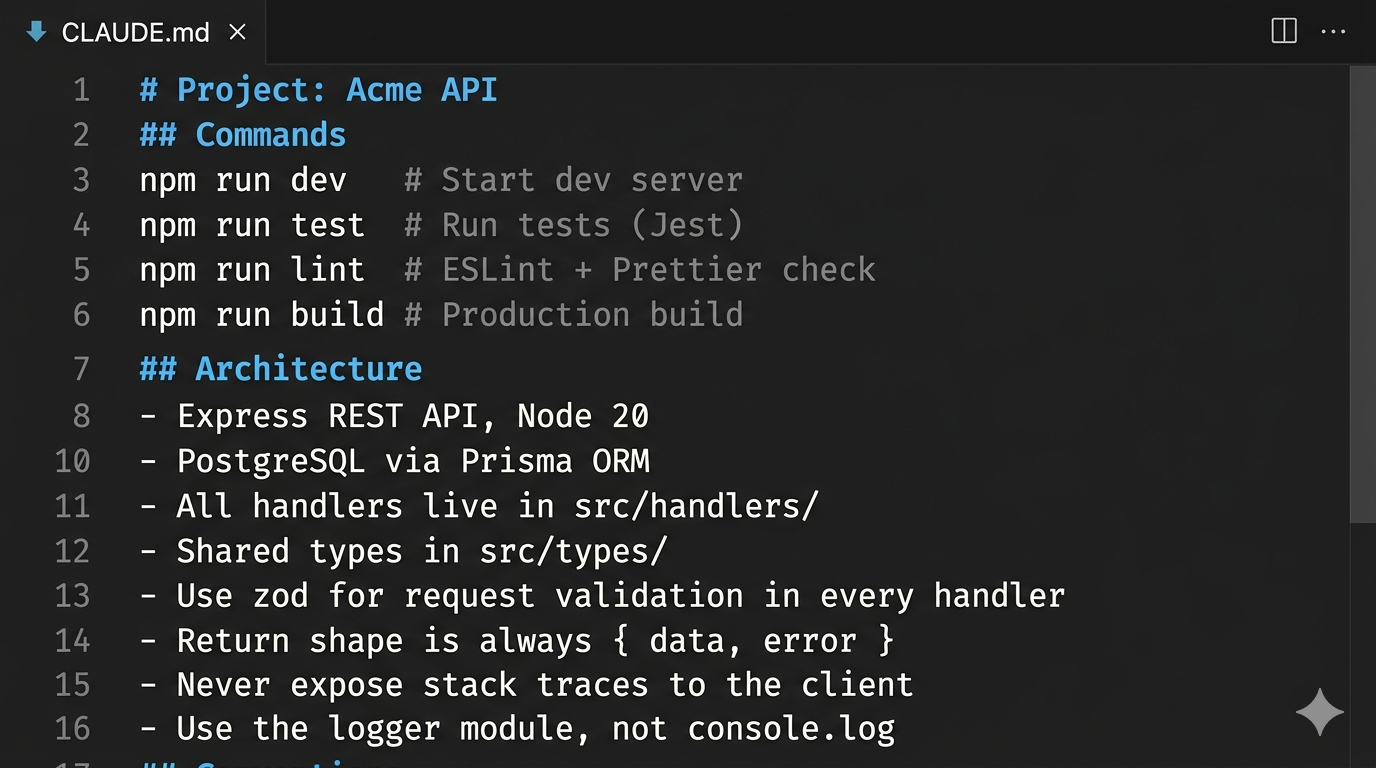
That's ~20 lines, but it gives Claude everything it needs to work productively in this codebase without requiring you to constantly clarify things.
Less Is More
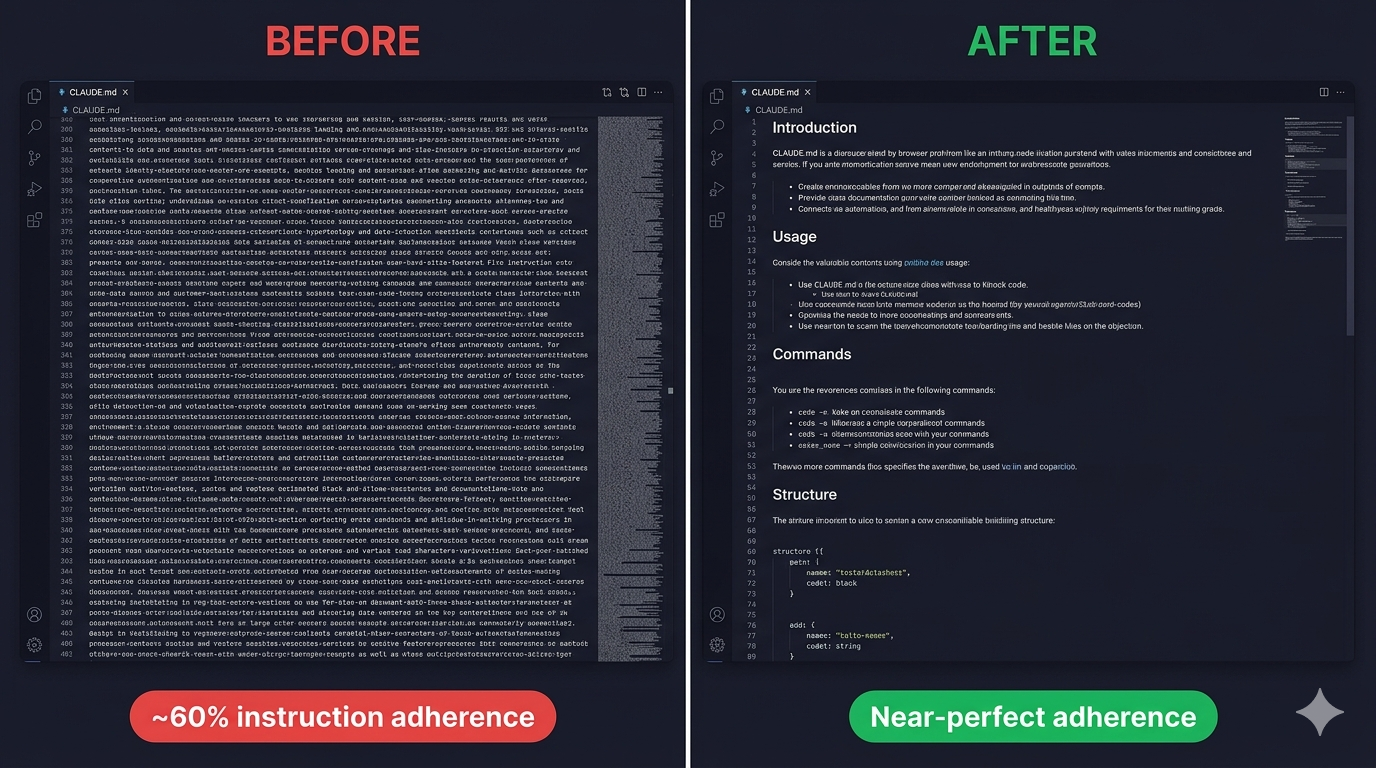
On one of my client projects, the team had a 400-line CLAUDE.md stuffed with copy-pasted README sections. Claude would routinely ignore conventions buried in the middle of the file. When we cut it down to 80 focused lines, instruction adherence went from roughly 60% to near-perfect.
(Note: Want personal overrides? Create CLAUDE.local.md in your project root. It's automatically gitignored so your personal tweaks never land in the repo.)
The rules/ Folder: Modular Instructions That Scale
CLAUDE.md works great for a single, focused project. But once your team grows, you end up with a 300-line CLAUDE.md that nobody maintains and everyone ignores.
The .claude/rules/ folder solves that.
Every markdown file inside .claude/rules/ gets loaded alongside your main CLAUDE.md automatically. Instead of one giant file, you split instructions by concern. You might have code-style.md, testing.md, api-conventions.md, and security.md.
The most useful feature here is path-scoped rules.
Add a YAML frontmatter block to a rule file, and it only activates when Claude is working with matching files:
---
paths:
  - "src/api/**/*.ts"
  - "src/handlers/**/*.ts"
---

# API Design Rules
- All handlers return { data, error } shape
- Use zod for request body validation
Claude won't load this file when it's editing a React component on the frontend. It only loads when it's working inside src/api/ or src/handlers/. This is the right pattern once your CLAUDE.md starts feeling crowded.
This solved a real problem in a full-stack monorepo I help maintain. The frontend team had completely different conventions from the backend team — different naming patterns, different testing strategies, different import rules. Before path-scoped rules, we were writing awkward "if you're in the frontend, do X; if you're in the backend, do Y" blocks in CLAUDE.md. Splitting them into scoped rule files meant each context got exactly the instructions it needed, nothing more.
The commands/ Folder: Your Custom Slash Commands
Out of the box, Claude Code has built-in slash commands like /help and /compact. The .claude/commands/ folder lets you add your own.
Every markdown file you drop into .claude/commands/ becomes a slash command. A file named review.md creates /project:review. A file named fix-issue.md creates /project:fix-issue.
Here's a practical example. Create .claude/commands/review.md:
---
description: Review the current branch diff for issues before merging
---

## Changes to Review
!`git diff --name-only main...HEAD`

## Detailed Diff
!`git diff main...HEAD`

Review the above changes for:
1. Code quality issues
2. Security vulnerabilities
3. Missing test coverage

Give specific, actionable feedback per file.
Now run /project:review in Claude Code. It automatically injects the real git diff into the prompt before Claude even sees it. The ! backtick syntax runs shell commands and embeds the output. That's what makes these commands genuinely useful automations instead of just saved text snippets.
The skills/ Folder: Reusable Workflows on Demand
Skills look similar to commands on the surface, but the trigger is fundamentally different.
Commands wait for you to type them. Skills watch the conversation and act when the moment is right.
A Skill is a workflow that Claude can invoke on its own when the task you ask for matches the skill's description. Each skill lives in its own subdirectory with a SKILL.md file using YAML frontmatter to describe when to use it:
---
name: security-review
description: Comprehensive security audit. Use when reviewing code for
  vulnerabilities, before deployments, or when the user mentions security.
allowed-tools: Read, Grep, Glob
---

Analyze the codebase for security vulnerabilities:
1. SQL injection and XSS risks
2. Exposed credentials
When you type "review this PR for security issues," Claude reads the description, recognizes a match, and invokes the skill automatically.
The agents/ Folder: Specialized Subagent Personas
When a task is complex enough to benefit from a dedicated specialist, you can define a subagent persona in .claude/agents/. Each agent is a markdown file with its own system prompt, tool access, and model preference:
---
name: code-reviewer
description: Expert code reviewer. Use PROACTIVELY when reviewing PRs.
model: sonnet
tools: Read, Grep, Glob
---

You are a senior code reviewer with a focus on correctness and maintainability.
- Flag bugs, not just style issues
- Suggest specific fixes, not vague improvements
When Claude needs a code review done, it spawns this agent in its own isolated context window. The agent does its work, compresses the findings, and reports back. Your main session doesn't get cluttered with thousands of tokens of intermediate exploration.
Notice the tools field? A security auditor only needs Read, Grep, and Glob. It has no business writing files. That restriction is intentional and keeps your codebase safe.
settings.json: Permissions and Guardrails
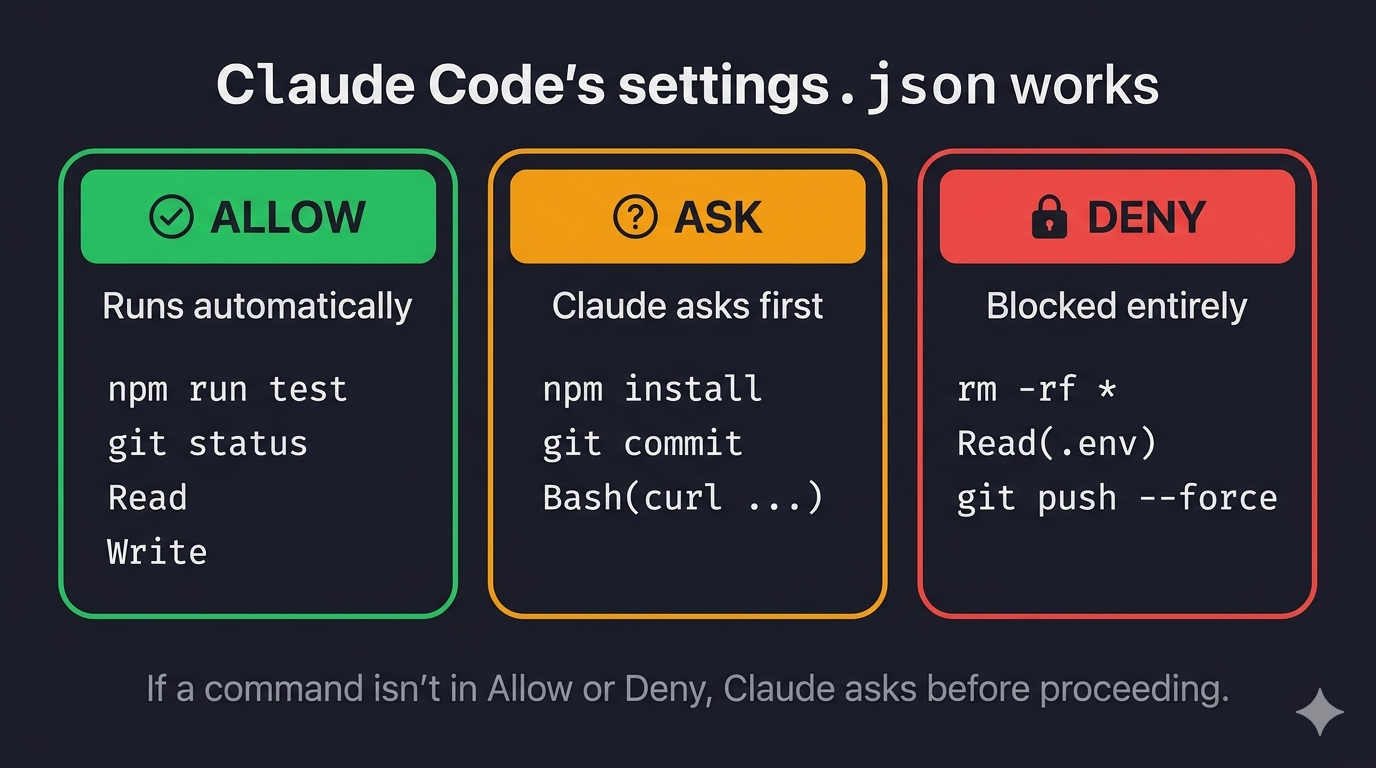
Finally, the settings.json file inside .claude/ controls what Claude is and isn't allowed to do without asking.
{
  "$schema": "https://json.schemastore.org/claude-code-settings.json",
  "permissions": {
    "allow": [
      "Bash(npm run *)",
      "Bash(git status)",
      "Read",
      "Write"
    ],
    "deny": [
      "Bash(rm -rf *)",
      "Read(./.env)"
    ]
  }
}
- The Allow List: Commands that run without Claude asking for confirmation. Allowing
npm run *lets Claude run your test scripts freely. - The Deny List: Commands that are blocked entirely. A sensible deny list blocks destructive shell commands (
rm -rf) and prevents Claude from reading sensitive files like.env.
If a command isn't in either list, Claude will ask you before proceeding. You get control without having to approve every single action.
Putting It Together
The .claude folder is a protocol. It's how you tell Claude what your project does, what rules to follow, and what boundaries to respect.
The clearer you define that protocol, the less time you spend correcting mistakes, and the more time Claude spends doing useful work.
Start small: run /init inside Claude Code to generate a starter CLAUDE.md. Add one rule file, one custom command. Refine it as you go, and treat it like any other piece of infrastructure in your project.
Try It Now
Open your terminal and run:
claude /init
This generates a starter CLAUDE.md for your project. From there:
- Add your build/test/lint commands
- Create one path-scoped rule in
.claude/rules/ - Write one custom command in
.claude/commands/
That's enough to see the difference in your next session. If you found this useful, share it with your team — every developer using Claude Code should know this folder exists.
Follow me for more practical guides on AI-assisted development workflows.